System architecture
How SecureStreamStudio works
A secure, self-hosted, browser-native streaming studio. Guests join an encrypted WebRTC room, a Fastify control plane vends tokens and guards capacity, LiveKit routes the media, and a headless-Chromium egress worker composites the scene and streams it to YouTube Live — all on a single box, with every metric on the homepage sampled live from that machine.
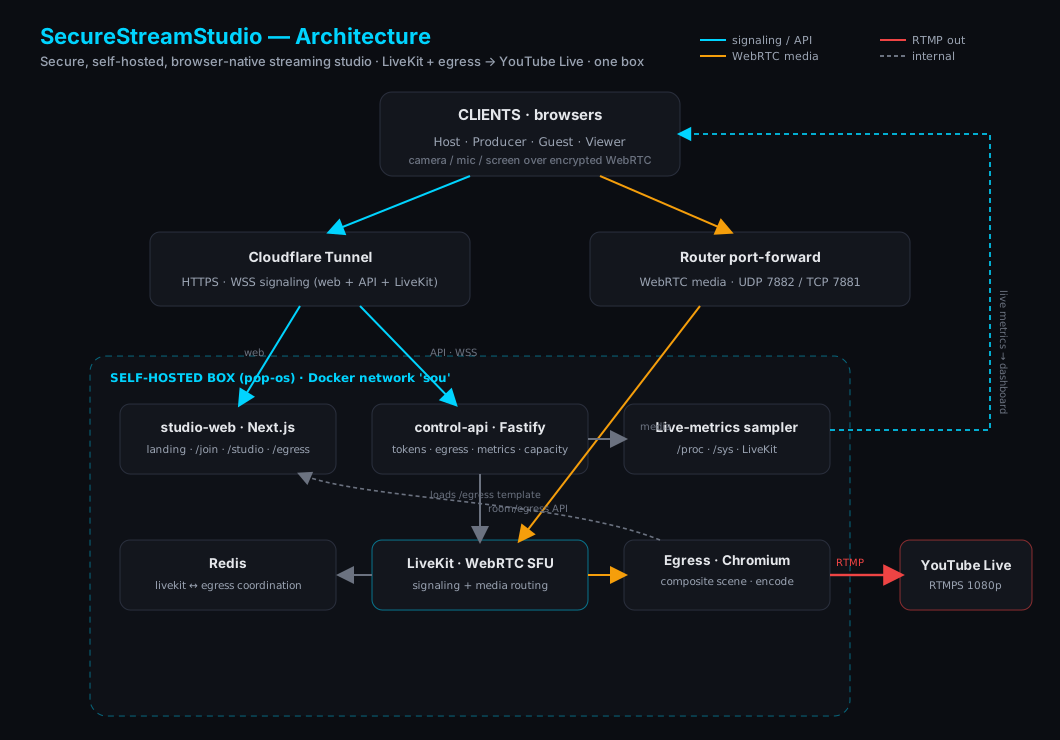
The system, layer by layer
Clients (browsers)
Hosts, producers, guests, and viewers join from any browser — nothing to install.
- ›Roles: host & producer (publish + room admin), guest (publish), viewer (subscribe only).
- ›WebRTC media (camera/mic/screen) over encrypted DTLS-SRTP via livekit-client.
- ›Pre-join ConnectionCheck probes bandwidth/RTT and predicts a quality tier (1080p→audio-first).
Edge / networking
Two paths reach the box: a Cloudflare tunnel for web/signaling, a router port-forward for media.
- ›Cloudflared tunnel carries HTTPS + WSS (the site, the API, LiveKit signaling).
- ›WebRTC media can't traverse the tunnel — the router forwards UDP 7882 / TCP 7881 to the box.
- ›LiveKit advertises the public IP as an ICE candidate (prod maps it onto loopback).
studio-web (Next.js 15)
The React app: public site + the studio itself + the egress render template.
- ›Routes: / (landing + live metrics), /join, /studio/[room], /egress/[room], /architecture.
- ›Studio uses @livekit/components-react (LiveKitRoom, layouts) + an OBS-style SceneRenderer.
- ›SceneRenderer is shared by the studio preview AND the egress template → preview == output.
control-api (Fastify)
Stateless control plane: tokens, rooms/scenes, egress control, capacity, and metrics.
- ›POST /api/tokens — capacity-gated LiveKit JWTs with role grants (issueToken).
- ›/api/rooms* (scene metadata), /api/egress/{start,stop}, GET /api/egress, /api/netcheck/{down,up}.
- ›GET /api/metrics — public, 2s-cached host + studio telemetry. checkCapacity() guards join + go-live.
LiveKit SFU
Routes real-time WebRTC media between participants and the egress recorder.
- ›WSS signaling (via cloudflared) + selective forwarding of media tracks.
- ›VP9 + maintain-resolution screen share; ICE tuned per env (staging bridge / prod public IP).
- ›Redis-backed coordination shared with egress.
Egress worker → YouTube
Headless Chromium composites the scene and streams it out — the heaviest workload.
- ›Loads /egress/[room]; EgressHelper connects + START_RECORDING; SceneRenderer + RoomAudioRenderer.
- ›Encodes H264 1080p30 → RTMPS to YouTube Live — streamed straight out, never written to disk.
- ›Streams to YouTube Live today; more platforms (Twitch, RTMP targets) planned.
- ›RoomComposite is CPU-intensive — the capacity cap limits concurrent streams.
Live-metrics pipeline
Every number on the landing page is real, sampled from the actual machine.
- ›Sampler reads /proc/stat (CPU), /proc/meminfo (RAM), statfs (disk), /sys/class/thermal (temp).
- ›Host network throughput summed from physical-NIC counters in /sys/class/net.
- ›LiveKit supplies live users / active streams / anonymized sessions → /api/metrics → useMetrics poll.
The box & capacity
It all runs on one self-hosted machine — so we cap load instead of melting down.
- ›Single host (Docker Compose on the `sou` network); Redis, LiveKit, egress, API, web co-located.
- ›Caps: MAX_PARTICIPANTS (16), MAX_STREAMS (3), MAX_CPU_PERCENT (92) → 503 'at capacity'.
- ›When full, joins/go-live return a friendly 'support us' response.
Deployment
Isolated staging and production stacks, both behind the same Cloudflare tunnel.
- ›Staging: studiostream.* hostnames, loopback ports 18130/18140 + LiveKit 789x.
- ›Prod (cloudflared): studio./api./livekit.${DOMAIN}, media port-forward 7881/7882, Dokploy-managed.
- ›Read-only host mount (/hostfs) gives the API real disk + hostname for the dashboard.
Data flows
Joining a studio
- 1.Browser → /join → /studio/[room] with a role.
- 2.ConnectionCheck probes /api/netcheck; user clicks Join.
- 3.fetchToken → POST /api/tokens (capacity-gated) → LiveKit JWT.
- 4.WSS signaling via cloudflared; WebRTC media via the port-forward → SFU.
Going live to YouTube
- 1.Host sets a layout + stream key, clicks Go Live.
- 2.POST /api/egress/start (capacity-gated) → startRoomCompositeEgress.
- 3.Egress Chromium loads /egress/[room] and composites the scene.
- 4.H264 1080p30 → RTMPS → YouTube Live (nothing saved to disk).
Live metrics
- 1.A 2s sampler reads OS /proc + /sys + LiveKit.
- 2.GET /api/metrics returns a cached host + studio snapshot.
- 3.useMetrics polls every 2s, keeping a rolling history.
- 4.The dashboard renders KPIs, charts, gauges, and sessions.
Built with
Self-hostable on a single box. Open the architecture diagram in Excalidraw to explore or remix it.